Since starting my new role, I have had the opportunity to dive deeper into the world of Service Mesh technologies, with a particular focus on Istio. While working more closely with the platform, I realized that understanding high-level concepts alone was not enough. I wanted to develop a clearer understanding of Istio’s internal components, how they interact with each other, and the discovery logic behind the platform.
This post is intended as a deeper technical exploration of Istio, focusing on its core components, internal architecture, and service discovery logic rather than introductory concepts.
Installation
istio-base
The istio-base chart installs the foundational resources required for Istio, including Custom Resource Definitions (CRDs) that define the various Istio components. It also sets up the necessary roles, service accounts, and basic configurations that other Istio components depend on.
At a high level, istio-base includes three main categories of resources:
CustomResourceDefinitions (CRDs)
These CRDs define the Istio API surface used by users and control plane components to configure traffic management, security, and telemetry:
- authorizationpolicies.security.istio.io
- destinationrules.networking.istio.io
- envoyfilters.networking.istio.io
- gateways.networking.istio.io
- peerauthentications.security.istio.io
- proxyconfigs.networking.istio.io
- requestauthentications.security.istio.io
- serviceentries.networking.istio.io
- sidecars.networking.istio.io
- telemetries.telemetry.istio.io
- virtualservices.networking.istio.io
- wasmplugins.extensions.istio.io
- workloadentries.networking.istio.io
- workloadgroups.networking.istio.io
These CRDs are the core of the Istio configuration model and are required before installing istiod.
Admission Control (Webhooks)
Istiod installs Kubernetes admission webhooks to validate and mutate Istio resources:
- Validating webhook (istio-validator-istio-system): ensures Istio resources conform to schema and basic semantic rules before persistence.
- Mutating webhook (istio-sidecar-injector): injects Envoy sidecars (in sidecar-based deployments) or applies default configuration.
Cluster-Scoped RBAC
The base chart installs ClusterRoles and ClusterRoleBindings required by Istio components such as the control plane and gateways to access Kubernetes resources:
ClusterRoles and ClusterRoleBindings for:
- istiod
- ingress/egress gateways
- read-only access components
These permissions enable Istio components to watch, read, and reconcile cluster state across namespaces.
Service Accounts
- istio-reader-service-account
Used by components that require read-only access to cluster resources, typically for discovery and observability purposes.
Configuration Resources
Istio also installs a small set of ConfigMaps used for internal coordination and identity distribution:
- istio-ca-root-cert
- istio-gateway-status-leader
- istio-leader
- istio-namespace-controller-election
These support internal control plane coordination, certificate distribution, and leader election mechanisms.
istiod
The istiod (istio-discovery) component is the central control plane of Istio. It is responsible for translating user-defined mesh configuration into runtime behavior for data plane proxies (Envoy), distributing service discovery information, and managing workload identities through certificate issuance and rotation.
At a high level, istiod acts as a reconciliation and distribution layer between Kubernetes state and the Envoy proxies running in the cluster. It does not directly control Envoy, but instead exposes configuration and service discovery data through the xDS APIs, which Envoy continuously watches and pulls.
1. Configuration Processing
Istiod watches Kubernetes resources (CRDs such as VirtualService, DestinationRule, Gateway, etc.) and translates them into proxy-readable configuration.
2. Service Discovery (xDS)
Istiod acts as the xDS server for Envoy:
- Endpoint discovery (EDS)
- Route discovery (RDS)
- Cluster discovery (CDS)
- Listener discovery (LDS)
Envoy proxies (istio-proxy) pull updates from istiod, rather than receiving push commands.
3. Identity and Certificate Management
Istiod includes a built-in CA (or integrates with external CAs) to:
- Issue workload certificates
- Enable mutual TLS (mTLS)
- Rotate certificates automatically
4. Policy Enforcement
Istiod evaluates and distributes security policies such as:
- AuthorizationPolicy
- PeerAuthentication
- RequestAuthentication
🚀 Create Istio Ingress Gateway
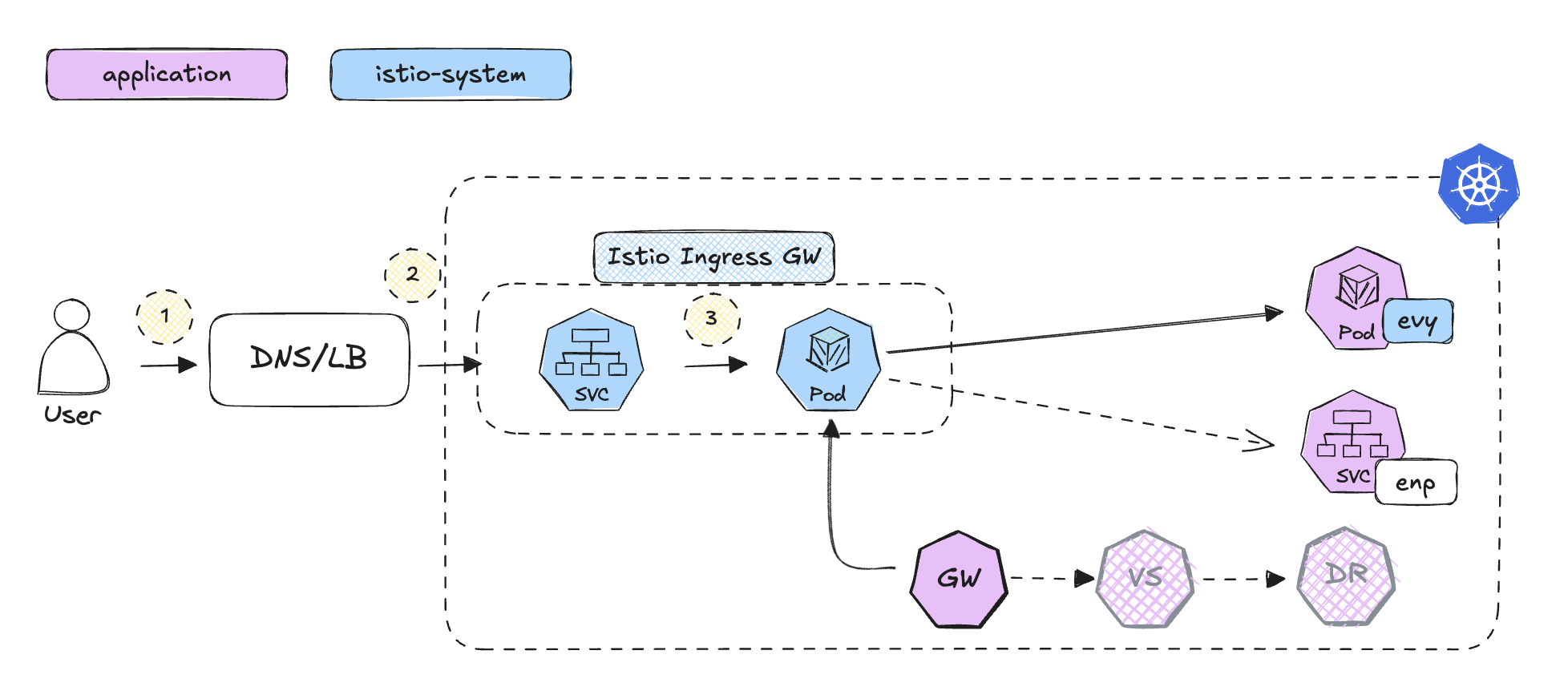
For simplicity, we won’t use VirtualService or DestinationRule this time and create only Ingress and Gateway
# install and inject istio
istioctl install --set profile=demo -y
kubectl label namespace application istio-injection=enabled

# deploy ingress rule
kubectl apply -f istio-deepdive/ingress/istio-ingress.yaml
kubectl get ingress -A

# deploy
kubectl apply -f istio-deepdive/ingress/istio-gateway.yaml
kubectl get gateway -A

# restart target apps
kubectl delete -f istio-deepdive/depl-helloworld.yaml
kubectl apply -f istio-deepdive/depl-helloworld.yaml
Istio Gateway
This section provides a high-level walkthrough of how traffic flows through an Istio ingress gateway, from an external client request to the target workload inside the cluster. It focuses on the request path through DNS resolution, load balancing, Envoy processing, and service routing, as well as how the same flow can be observed through logs and proxy configuration for debugging purposes.
1. User Initiates Request:
Users can now call the external ClusterIP (http://192.168.76.2) with the Ingress port (e.g., 30736).
# retrive ingressgateway http TCP port (e.g. 30154)
export INGRESS_PORT=$(kubectl -n istio-system get svc istio-ingressgateway -o jsonpath='{.spec.ports[?(@.name=="http2")].nodePort}')

# verfiy
curl http://$CLUSTER_IP:$INGRESS_PORT/v1
curl -s -HHost:yuya.example.com http://$CLUSTER_IP:$INGRESS_PORT/v1
2. DNS Resolution:
The DNS resolves the hostname to the IP address of the service.
kubectl get svc -n istio-system istio-ingressgateway
3. LoadBalancer Routes the Request to the Ingress Gateway:
The LoadBalancer forwards the request to the Istio Gateway pod, where the ingress rules are applied.
kubectl get svc -n istio-system istio-ingressgateway -o jsonpath='{.spec.type}'
4. Ingress Controller Processes the Request:
The Istio Gateway applies ingress rules and routes traffic to the correct endpoint. For example, traffic to /v1 is routed to the correct service endpoint (e.g., 10.244.0.10:5678).
# check logs
ISTIO_INGRESS_GW=$(kubectl get -n istio-system pod -l app=istio-ingressgateway -ojsonpath='{.items[0].metadata.name}')
kubectl logs $ISTIO_INGRESS_GW -n istio-system
Example log entry:
[2024-09-15T12:35:56.471Z] "GET /v1 HTTP/1.1" 200 - via_upstream - "-" 0 33 0 0 "10.244.0.1" "curl/7.81.0" "3170f1cf-61ea-9166-b63c-35273a31e6f5" "yuya.example.com" "10.244.0.10:5678" outbound|7777||dest-svc-v1.application.svc.cluster.local 10.244.0.8:52522 10.244.0.8:8080 10.244.0.1:6131 - -
check the istio-ingressgateway Pod IP:
kubectl get pod -o wide --all-namespaces | grep 10.244.0.8
- Hostname:
yuya.example.com - A unique request ID or trace ID:
3170f1cf-61ea-9166-b63c-35273a31e6f5 - The destination IP and port of the service Endpoints:
10.244.0.10:5678 - Outbound to dest-svc-v1 in the application namespace with the specified port 7777:
outbound|7777||dest-svc-v1.application.svc.cluster.local - Source Pod IP (istio-ingressgateway):
10.244.0.8
5. Service Routes the Request to the Target Pod:
The service follows a similar path to the NGINX Ingress setup.
6. DNS Query Validation:
You can see a very similar structured log of the istio-ingressgateway in the envoy container
# check pod IP and DNS logs
POD=$(kubectl get pod -l app=hw-v1 -ojsonpath='{.items[].metadata.name}')
kubectl get pod $POD -o jsonpath='{.status.podIP}'
kubectl logs -c istio-proxy $POD
Example log entry:
[2024-09-15T12:35:56.471Z] "GET /v1 HTTP/1.1" 200 - via_upstream - "-" 0 33 0 0 "10.244.0.1" "curl/7.81.0" "3170f1cf-61ea-9166-b63c-35273a31e6f5" "yuya.example.com" "10.244.0.10:5678" inbound|5678|| 127.0.0.6:42109 10.244.0.10:5678 10.244.0.1:0 outbound_.7777_._.dest-svc-v1.application.svc.cluster.local default
- Hostname:
yuya.example.com - A unique request ID or trace ID:
3170f1cf-61ea-9166-b63c-35273a31e6f5 - The destination IP and port of the service Endpoints:
10.244.0.10:5678 - Inbound from dest-svc-v1 in the application namespace with the specified port 5678:
inbound|5678|| - Envoy / Istio Proxy IP:
127.0.0.6:42109 - Client ip with the cluster
10.244.0.1:0 - Outbond Routing from the target service:
outbound_.7777_._.dest-svc-v1.application.svc.cluster.local default
Debugging with istioctl proxy-config
One of Istio’s most powerful features is its ability to provide deep insights into network traffic and proxy configurations using the istioctl command-line tool. These commands can significantly help identify misconfigurations, routing errors, or any networking anomalies within your Istio service mesh.
istioctl proxy-config cluster $POD -n application

istioctl proxy-config listener $POD -n application

istioctl proxy-config route $POD -n application

istioctl proxy-config all $POD -n application
Clean up
istioctl uninstall --purge -y
kubectl delete -f istio-deepdive/ingress
Egress Gateway
An Egress Gateway in Istio is a dedicated, controlled exit point for outbound traffic leaving the service mesh. It enables centralized enforcement of security policies, observability, and traffic management for requests going to external services, rather than allowing direct outbound access from workloads.
Setting Up the Istio Environment
# Install Istio will allow outbound traffic to any external service by default and enable access logging
istioctl install -y --set profile=demo --set meshConfig.outboundTrafficPolicy.mode=ALLOW_ANY --set meshConfig.accessLogFile=/dev/stdout

# Install Kiali for monitoring
kubectl apply -f https://raw.githubusercontent.com/istio/istio/release-1.23/samples/addons/prometheus.yaml
kubectl apply -f https://raw.githubusercontent.com/istio/istio/release-1.23/samples/addons/kiali.yaml
kubectl port-forward svc/kiali 20001:20001 -n istio-system

# Create a demo application environment
kubectl create ns application
kubectl config set-context --current --namespace=application
kubectl label namespace application istio-injection=enabled
kubectl get ns application --show-labels

# Deploy sample applications
kubectl apply -f istio-deepdive/depl-sleep.yaml
kubectl apply -f istio-deepdive/depl-helloworld.yaml
Calling Internal and External Services
# Get the source pod for the sleep application
SOURCE_POD=$(kubectl get pod -l app=sleep -o jsonpath={.items..metadata.name})
Call an internal service
TARGET_URL="dest-svc-v1.application.svc.cluster.local:7777"
while true; do kubectl exec "$SOURCE_POD" -c sleep -- curl -sSI $TARGET_URL | grep  "HTTP/"; sleep 2; done;
HTTP/1.1 200 OK
Call an external service
TARGET_URL=http://google.com
while true; do kubectl exec "$SOURCE_POD" -c sleep -- curl -sSI $TARGET_URL | grep  "HTTP/"; sleep 2; done;
HTTP/1.1 200 OK
Enabling REGISTRY_ONLY Mode
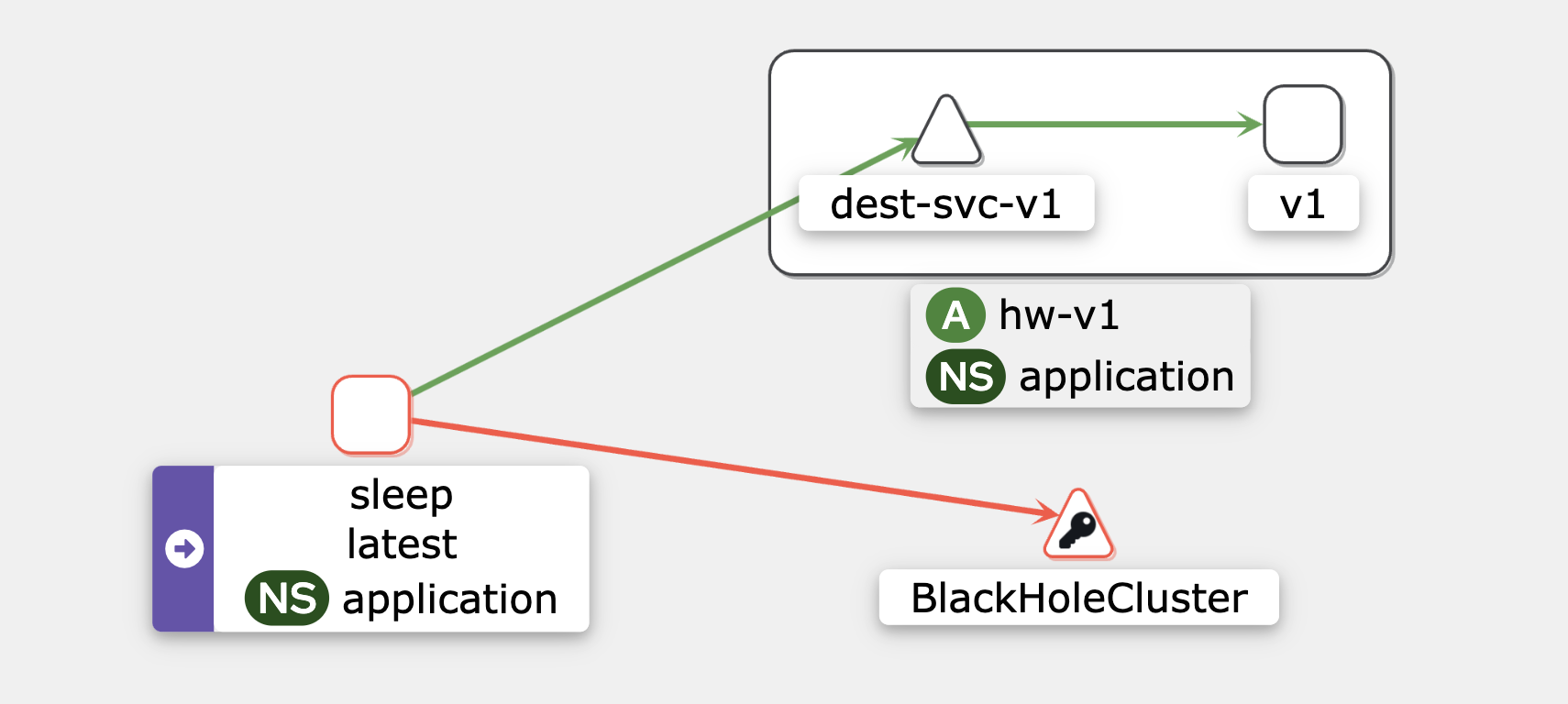
In REGISTRY_ONLY mode, Istio only allows traffic to services that are registered in the service mesh. Traffic to any unregistered external service will be blocked, and routed to the BlackHoleCluster.
# Check the current outbound traffic mode
kubectl get cm istio -n istio-system -o jsonpath='{.data.mesh}' | grep mode

# Re-install Istio with REGISTRY_ONLY mode enabled
istioctl install -y --set profile=demo --set meshConfig.outboundTrafficPolicy.mode=REGISTRY_ONLY --set meshConfig.accessLogFile=/dev/stdout

# Verify that REGISTRY_ONLY mode is active
kubectl get cm istio -n istio-system -o jsonpath='{.data.mesh}' | grep mode
Call an internal service
TARGET_URL="dest-svc-v1.application.svc.cluster.local:7777"
while true; do kubectl exec "$SOURCE_POD" -c sleep -- curl -sSI $TARGET_URL | grep  "HTTP/"; sleep 2; done;
HTTP/1.1 200 OK
Call an external service
TARGET_URL=http://google.com
while true; do kubectl exec "$SOURCE_POD" -c sleep -- curl -sSI $TARGET_URL | grep  "HTTP/"; sleep 2; done;
HTTP/1.1 502 Bad Gateway
ServiceEntry
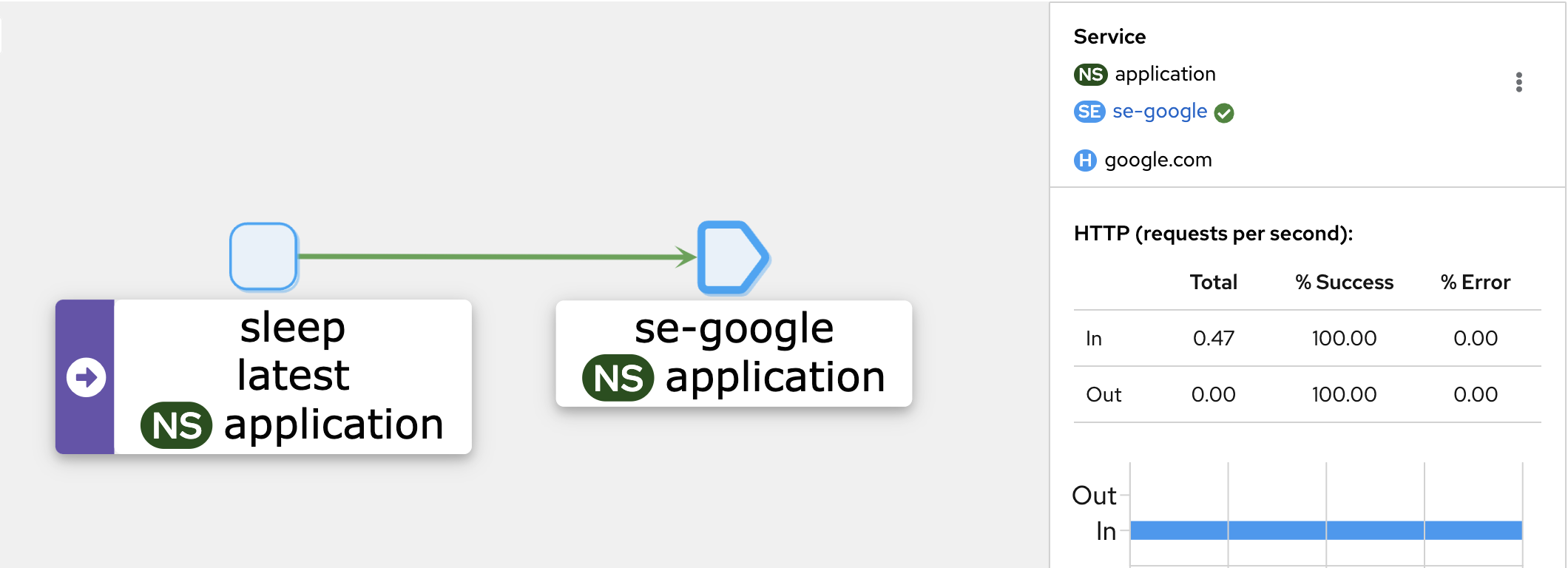
A ServiceEntry allows Istio to treat external services (like third-party APIs) as if they are part of the service mesh. This enables internal services to discover and route traffic to external services.
kubectl apply -f - <<EOF
apiVersion: networking.istio.io/v1
kind: ServiceEntry
metadata:
  name: se-google
  namespace: application
spec:
  hosts:
  - google.com
  ports:
  - number: 80
    name: http-port
    protocol: HTTP
  - number: 443
    name: https
    protocol: HTTPS
  resolution: DNS
EOF

kubectl get serviceentry -n application
Call google.com
TARGET_URL=http://google.com
while true; do kubectl exec "$SOURCE_POD" -c sleep -- curl -sSI $TARGET_URL | grep  "HTTP/"; sleep 2; done;
HTTP/1.1 200 OK
Call github.com
# Call GitHub (HTTP/1.1 502 Bad Gateway - no ServiceEntry defined)
TARGET_URL=http://github.com/
while true; do kubectl exec "$SOURCE_POD" -c sleep -- curl -sSI $TARGET_URL | grep  "HTTP/"; sleep 2; done;
HTTP/1.1 502 Bad Gateway
Why is a ServiceEntry Not Enough?
While a ServiceEntry enables access to and discovery of external services, it lacks the control, security, and traffic management needed for outbound traffic. For more fine-grained control, you need to deploy additional Istio components, like the Egress Gateway.
Steps to Set Up an Egress Gateway
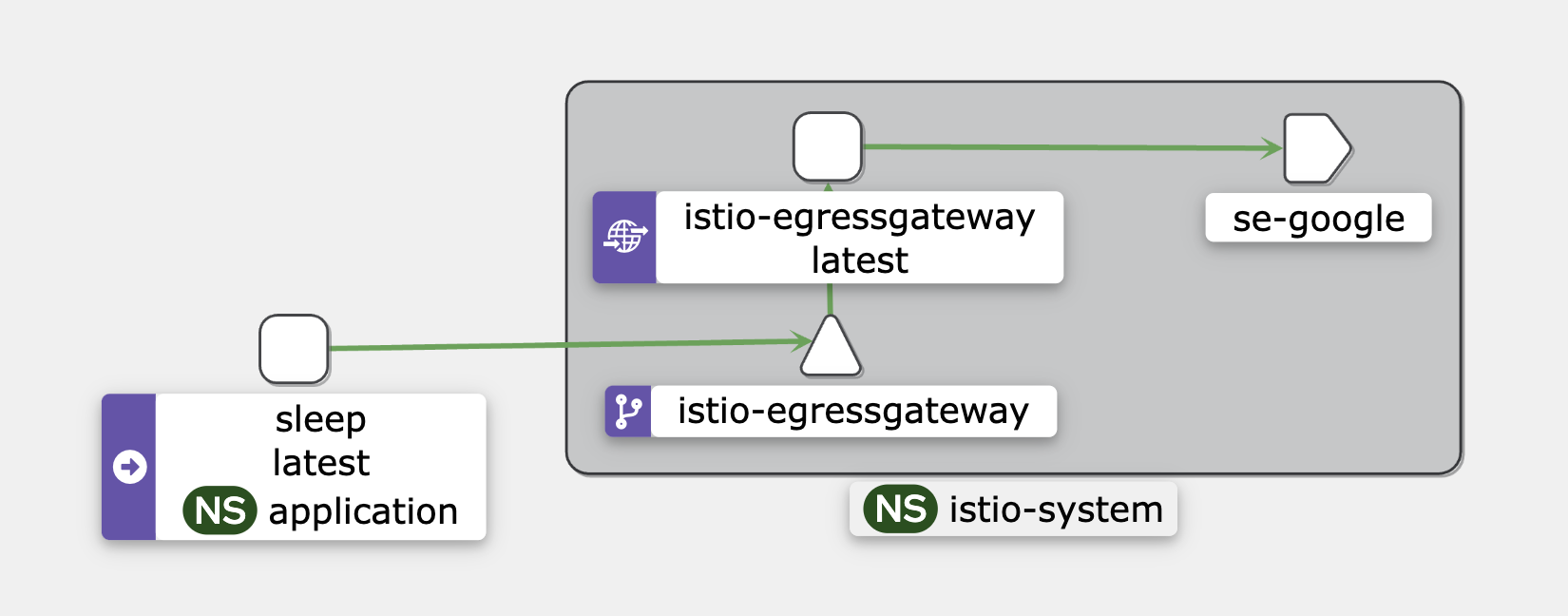
- Create an Egress gateway
gw-egress-googledirects outbound HTTP traffic togoogle.comon port80.
# Check if the Egress Gateway pod is running
kubectl get pod -l istio=egressgateway -n istio-system

# Apply the egress gateway configuration for Google
kubectl apply -f - <<EOF
apiVersion: networking.istio.io/v1
kind: Gateway
metadata:
  name: gw-egress-google
  namespace: application
spec:
  selector:
    istio: egressgateway
  servers:
  - port:
      number: 80
      name: http
      protocol: HTTP
    hosts:
    - google.com
EOF
- Create a Distination Rule
dr-egress-googlemanages traffic for Google’s services, which will be used in the VS configuration.
# Apply the Destination Rule and VirtualService for Google
kubectl apply -f - <<EOF
apiVersion: networking.istio.io/v1
kind: DestinationRule
metadata:
  name: dr-egress-google
  namespace: application
spec:
  host: istio-egressgateway.istio-system.svc.cluster.local
  subsets:
  - name: google
EOF
- Configure a Virutal Service
-
3.1. Inside the
mesh, traffic destined for google.com is first routed through theistio-egressgateway.istio-system.svc.cluster.local. -
3.2. Once the traffic leaves
istio-egressgateway, it is directed togoogle.comon port80.
kubectl apply -f - <<EOF
apiVersion: networking.istio.io/v1
kind: VirtualService
metadata:
  name: vs-google-via-egress-gw
spec:
  hosts:
  - google.com
  gateways:
  - gw-egress-google
  - mesh
  http:
  - match:
    - gateways:
      - mesh
      port: 80
    route:
    - destination:
        host: istio-egressgateway.istio-system.svc.cluster.local
        subset: google
        port:
          number: 80
      weight: 100
  - match:
    - gateways:
      - gw-egress-google
      port: 80
    route:
    - destination:
        host: google.com
        port:
          number: 80
      weight: 100
EOF
Call Google via the Egress GW
TARGET_URL=http://google.com
while true; do kubectl exec "$SOURCE_POD" -c sleep -- curl -sSI $TARGET_URL | grep  "HTTP/"; sleep 2; done;
Check Egress GW logs to verify traffic routing
kubectl logs -l istio=egressgateway -n istio-system
Example log entry:
[2024-09-21T10:00:43.708Z] "HEAD / HTTP/2" 301 - via_upstream - "-" 0 0 29 29 "10.244.0.66" "curl/8.10.1" "9cf4caf3-9faf-9689-bec3-8989898" "google.com" "142.250.184.206:80" outbound|80||google.com 10.244.0.58:45773 10.244.0.58:8080 10.244.0.66:57182 - -
- Sleep POD IP:
10.244.0.66 - External IP of Google:
142.250.184.206:80 - Egress Gateway IP:
10.244.0.58 - Route Info:
outbound|80||google.com
Clean up
istioctl uninstall --purge -y
kubectl delete -f istio-deepdive/egress